Jump to:
How do I use ASSIST to find transfer information?
NEW!! ASSIST AI Transfer Articulation & Exploration Tool
How do I ask questions and get help?
Where can I find admission requirements and other information that is not on ASSIST?
What is ASSIST?
ASSIST offers a tool, assist.org, that can help you find classes at a California Community College (CCC) that will transfer to a California State University (CSU), University of California (UC) campus, or participating Association of Independent California Colleges and Universities (AICCU) institution.
- ASSIST does not currently include campuses outside of the state of California. Please contact the campus you want to transfer to if you have questions about out-of-state credit.
- ASSIST is best used in combination with seeing a counselor or advisor on your campus. If you are not yet admitted, contact the campus you plan to attend.
- As of the 2024-2025 academic year, ASSIST includes articulation agreements from Association of Independent California Colleges and Universities (AICCU) participating member institutions. Participating institutions are discoverable in the agreement search box on assist.org.
- Begin by selecting the Academic Year. Use the
 icons to learn more information about which year to select.
- Select the institution you want to transfer course credit from.
- Select the institution you want to transfer course credit to:

If no agreement is available between the selected institutions for the selected academic year, red text will appear that advises of the next closest available academic year.
After clicking "View Agreements," the first thing you will see is View Agreement by Major, if available. Articulation agreements display how courses completed at a sending institution transfer to the selected CSU, UC, or AICCU institution. Use the icon to learn more about the different types of agreements. An option will be greyed out if that agreement type (Major, Department, Prefix, etc.) is not available. Each university is responsible for creating and publishing their agreements in ASSIST.
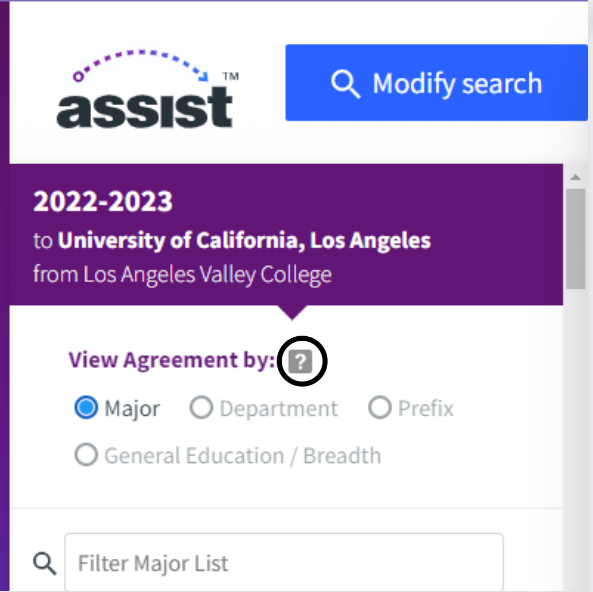
You may also view lists that indicate what CCC courses meet a variety of CSU and/or UC general education or admissions requirements. This includes lists that explicitly display which courses are CSU or UC transferable. “Transferable” in this context means you will receive unit credit at the CSU or UC you transfer to.
Review the important information available at the top of each list.
These resources provide step-by-step instructions for using ASSIST:
Understanding Effective Terms in ASSIST (PDF) will help you understand the "Effective Begin" and "Effective End" terms seen on the California General Education Transfer Curriculum (Cal-GETC) lists and the CSU US History, Constitution, and American Ideals Courses (CSU AI) lists available on ASSIST.

How do I ask questions and get help?
Where can I find admission requirements and other information that is not on ASSIST?
Use the following links to learn about additional admission resources in California.
Admissions Information
Additional Resources